The Outstanding Tiny Desk AI template, step by step
Updated
With Tiny Desk AI the “template” is simple: add 1 to 5 photos, pick which band spots they fill, and you get the finished 18-second vertical video, no editing. This guide covers the four shots, the five band spots, which photos work, how the video is made and how to add the “Outstanding” sound when you post.
1 to 5 photos · about 18 seconds · from $8.99, no subscription
What the “template” is, and what it isn’t
On TikTok and CapCut, an Outstanding Tiny Desk template is a project where you cut out faces yourself and paste them over the meme clip, frame by frame. It works, but it takes time and the faces often float.
Tiny Desk AI does it the other way round. It doesn’t edit the original clip at all: it draws your band in the same cramped-office-concert style from your photos, then turns that into a new video with the same four shots. The original clip and its recording are never hosted or shared here; your video comes without sound, and you add the song when you post.
New to the meme? Read where the Outstanding Tiny Desk meme came from
The four shots and their timing
Every Tiny Desk AI video follows the meme’s shot list, so it lines up with the first 18 seconds of the viral sound:
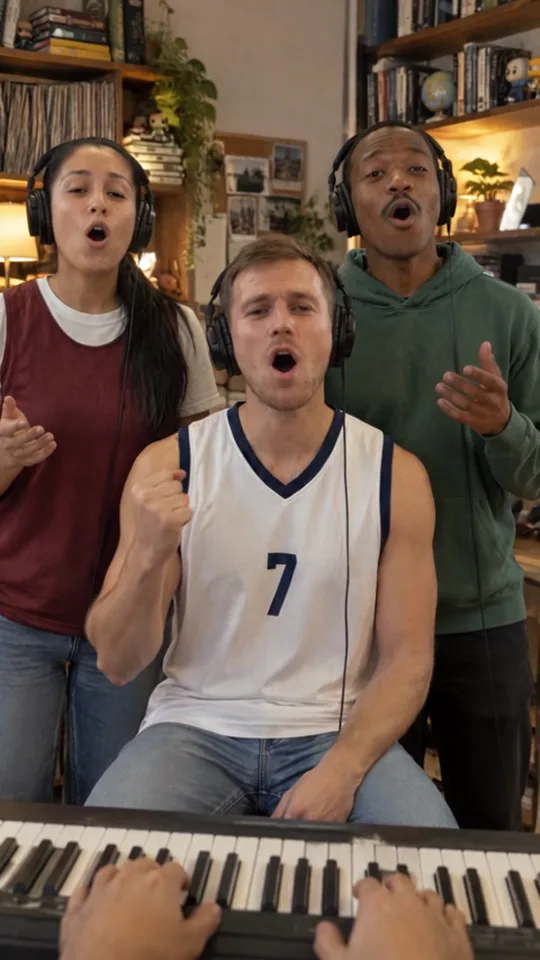
- 0 to 6.9 seconds: the three singers at the desk, the center singer on a stool with a fist in the air, all in headphones.
- 6.9 to 13.2 seconds: the big laugh. Close-up on the lead singer, who sings a line, breaks into a huge laugh, then sings again. This is the shot everyone remembers.
- 13.2 to 15.6 seconds: the sax solo, headphones on, leaning into it.
- 15.6 to 18 seconds: back to the three singers, louder than ever.
The five band spots and who to put where
There are five spots: left singer, center singer, right singer, lead singer and saxophone. The center singer is the star of the opening shot, so that is usually the friend everyone wants to see first. The lead singer is the fourth person, the one who gets the long note and the big laugh in the close-up. The sax player gets a solo of their own.
Fill one spot, all five, or anything in between. Every spot you leave alone is played by our house band, so a one-photo video still looks like a full concert.
Photo checklist
A phone photo is fine. For each spot you fill, use one photo of one person, facing the camera, face not covered by sunglasses or a hand. Face-and-shoulders or waist-up shots work best, because the lead singer and the sax player are shown close up.
Formats: JPG, PNG or WebP, at least 300 × 300 pixels, up to 10 MB each.
Only use photos of people who agreed to be in the video. Public figures and children are not allowed, and pets are not supported yet.
Step by step: make the video
Start on the home page. Every spot begins with a house-band photo; tap Change on the ones you want to replace.
- Pick your spots and add a photo for each one you want to change (at least one).
- Check out. One video is $8.99; three are $22.99 and eight are $49.99. You pay once, there is no subscription.
- Wait about 5 to 10 minutes. You can close the page: the video appears in My videos when it is ready.
- Download the MP4: 18 seconds, vertical 9:16, 480p (480 × 854), no watermark, no sound.
Add the “Outstanding” sound when you post
The singers’ lips are timed to the meme’s live “Outstanding” sound, so use that sound rather than the studio recording or another song. On TikTok, open the viral Tiny Desk AI clip, tap its sound, choose Use this sound and add your video. Keep the sound starting from the beginning; your 18-second video lines up with the first 18 seconds of the clip.
On Instagram Reels or YouTube Shorts, search for the same “Outstanding” Tiny Desk sound in the audio library and trim it to start at the beginning of the clip.
If something goes wrong
A failed render is given back to your account automatically. If a finished video is clearly wrong, contact us within 7 days and we will re-run it or give the video back. If you haven’t made any video from a purchase, you can get a full refund within 7 days.
Your photos are used only to make your video and are deleted once it is finished. The video stays in My videos for 30 days, so download it before then.
Questions
Is there a free Outstanding Tiny Desk AI template?
There are free templates on TikTok and CapCut, but you have to cut and place the faces yourself. Tiny Desk AI is a paid tool, from $8.99 for one video, and does the whole video from your photos.
Do I need CapCut or any editing skills?
No. You add photos and download the finished video. The only thing you do yourself is add the sound when you post.
Can I make it with just one photo?
Yes. Fill one spot and the other four are played by our house band.
How long does it take?
Usually 5 to 10 minutes. You can close the page and come back; the video is saved in My videos.
Is the video watermarked? Where can I post it?
No watermark. It is a vertical 480p MP4 without sound, so you can post it on TikTok, Instagram Reels, YouTube Shorts or send it to a group chat, adding the “Outstanding” sound where you post.
Put your people in the band
Make my Tiny Desk AI video